BSCS 21F


You can find All Study Material Here


  • Books
  • Course Outline
  • Lecture Notes
  • Grading Policy
  • Assignments


  •  Books:-

    • Introduction to Computers by Peter Norton 6th Edition
    • Computing Fundamentals by Fateh Wempen Wiley

    Course Outline

    Introduction to Information and Communication Technology

    • Definitions and Concepts
      1. Computer
      2. Input devices
      3. Storage devices

    • Hardware, Computer System and Components
      1. Hardware
      2. Software
      3. Liveware
      4. Microprocessor
      5. Data processing cycle
      6. CPU Execution Cycle
      7. Fetch execute cycle
      8. Primary Memory and Secondary Memory
      9. RAM and types of RAM
      10. ROM and types of ROM
      11. Cache Memory
      12. Buses and types of Buses
      13. Registers

    • Number System
      1. Computer Numbers System
      2. Binary Number System 
      3. Octal Number System
      4. Hexadecimal Number System.
      5. Decimal to Binary Conversion and vice versa
      6. Decimal to Hexadecimal Conversion and vice versa
      7. Decimal to Octal Conversion and vice versa
      8. Binary Addition, Binary Subtraction
      9. Binary Multiplication and Binary Division

    • Software
      1. Software and its types
      2. Application Software
      3. System Software

    • Operating systems
      1. Operating systems,
      2. Types of operating system,
      3. Multi-User operating system
      4. Single User Operating System
      5. Batch Processing Operating System
      6.  Distributed Operating System
      7. Network Operating System
      8. Time-Sharing Operating System
      9. Real Time Operating System

    • Network
      1. Network
      2. Types of Network
      3. LAN
      4. MAN
      5. WAN

    • Data Communication
      1. Data Communication
      2. Components of Data Communication
      3. Topologies
      4. Star
      5. Bus
      6. Mesh
      7. Ring Topology
      8. ASCII Codes

    • Software
      1. Software and its types
      2. Application Software
      3. System Software

    • Programming
      1. Introduction to C programming
      2. Input and Output
      3. Use of basic arithmetic operations,
      4. If else statement
      5. For Loop

    • Database and Information System
      1. Database
      2. Types of Database
      3. Distributed databases
      4. Relational databases
      5. Object-oriented databases
      6. Centralized database
      7. Open-source databases
      8. Cloud databases
      9. Hierarchical Database
      10. Database Components
      11. Concept of table
      12. Attributes
      13. Field
      14. Tuple
      15. Relationships
      16. DBMS

    • The Internet Browser and Search
      1. Introduction to browsing and methodologies
      2. Use of Google search engine
      3. Downloading files with different extensions computing

    • Email
      1. E-Mail Address
      2. E-mail Message Components
      3. E-mail Header
      4. Advantages & Disadvantages

    • Social Networking
      1. Social Networking
      2. Advantages & Disadvantages

    • E-Commerce
      1. E-Commerce, Features
      2. Traditional Commerce v/s E-Commerce
      3. Advantages & Disadvantage
      4. Business Models
      5. Payment Systems
      6. Security Systems

    • IT Security and other Issues
      1. IT security
      2. Threats to IT security
      3. Types of IT Security
      4. Endpoint Security
      5. Internet & Cloud Security
      6. User Security Advanced Persistent Threats (APTs)

    Computer: 

    Computer is a device that transforms data into meaningful information. It processes the input according to the set of instructions provided to it by the user and gives the desired output quickly. A Computer can perform the following set of functions:

    • Accept data
    • Store data
    • Process data as desired
    • Retrieve the stored data as and when required
    • Print the result in desired format.
    computer process cycle
    image from https://2.bp.blogspot.com

    Input Devices

    The electromagnetic devices that accept data or a set of instructions from the outside world and then translate that data into machine-readable and understandable form are known as input devices.

     Computer input devices serve as an interface between the outside world and the computer for proper communication. When the users enter data using various input devices, the data can be saved in computer memory for further processing and preparation. Using the output devices, the intended and calculated results can be acquired when the processing and handling are completed. An input device transmits data to a computer and allows you to communicate with it and control it.

    Storage Devices

    A storage device is any type of computing hardware that is used for storing, porting or extracting data files and objects. Storage devices can hold and store information both temporarily and permanently. They may be internal or external to a computer, server or computing device.


    Storage devices are available in different forms, depending on the type of underlying device. For example, a standard computer has multiple storage devices including RAM, a cache, and a hard disk. The same device may also have optical disk drives and externally connected USB drives.

    There are two different types of storage devices:

    Primary storage devices: Generally smaller in size, primary storage devices are designed to hold data temporarily and are internal to the computer. They have the fastest data access speed. These types of devices include RAM and cache memory.

    Secondary storage devices: Secondary storage devices usually have larger storage capacity, and they store data permanently. They can be either internal or external to the computer. These types of devices include the hard disk, the optical disk drive and USB storage device.


    Hardware

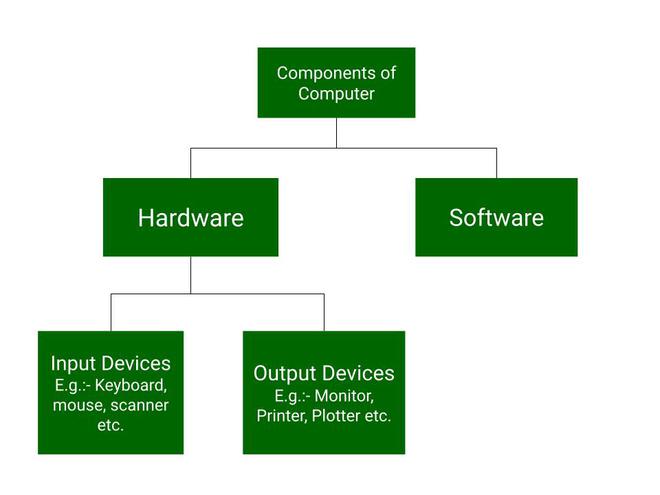
    Computer hardware is a physical device of computers that we can see and touch. For e.g. Monitor, CPU, Mouse, Joystick, etc. Using these devices, we can control computer operations like input and output. These hardware components are further divided into the following categories, which are:

    • Input Devices
    • Output Devices
    • Storage Devices
    • Internal Components
    computer components chart

    Liveware

    Liveware are peoples that operate computer system using hardware and software. These are devices that make any electronic or computer device work and execute tasks. These are people who make computer systems work behind scenes. Functions of hardware includes input, processing, storage and output.Type of livewares includes engineers, operators, managers, programmers, etc.

    Assignments Section

    Assignments no 1

    Perform Following Calvulations.

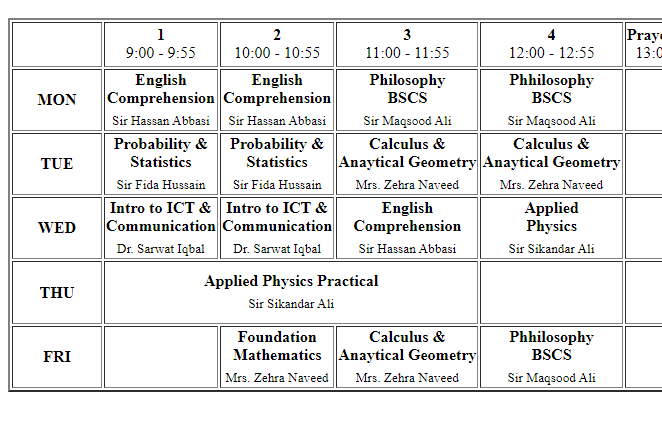
    Assignments no 2

    Create your period schedule in

    HTML

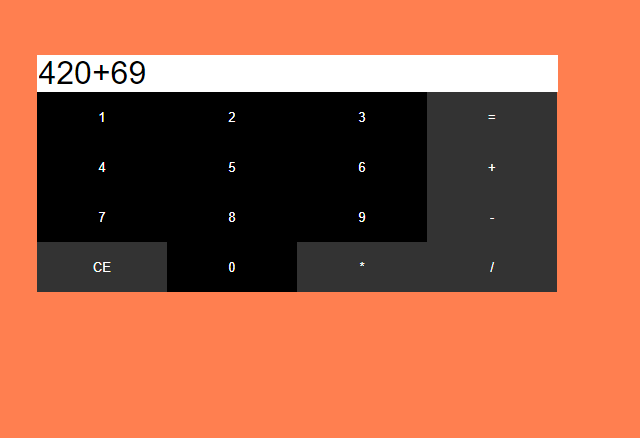
    Assignments no 3

    Create simple Calculator in

    HTML


    Free Web Hosting